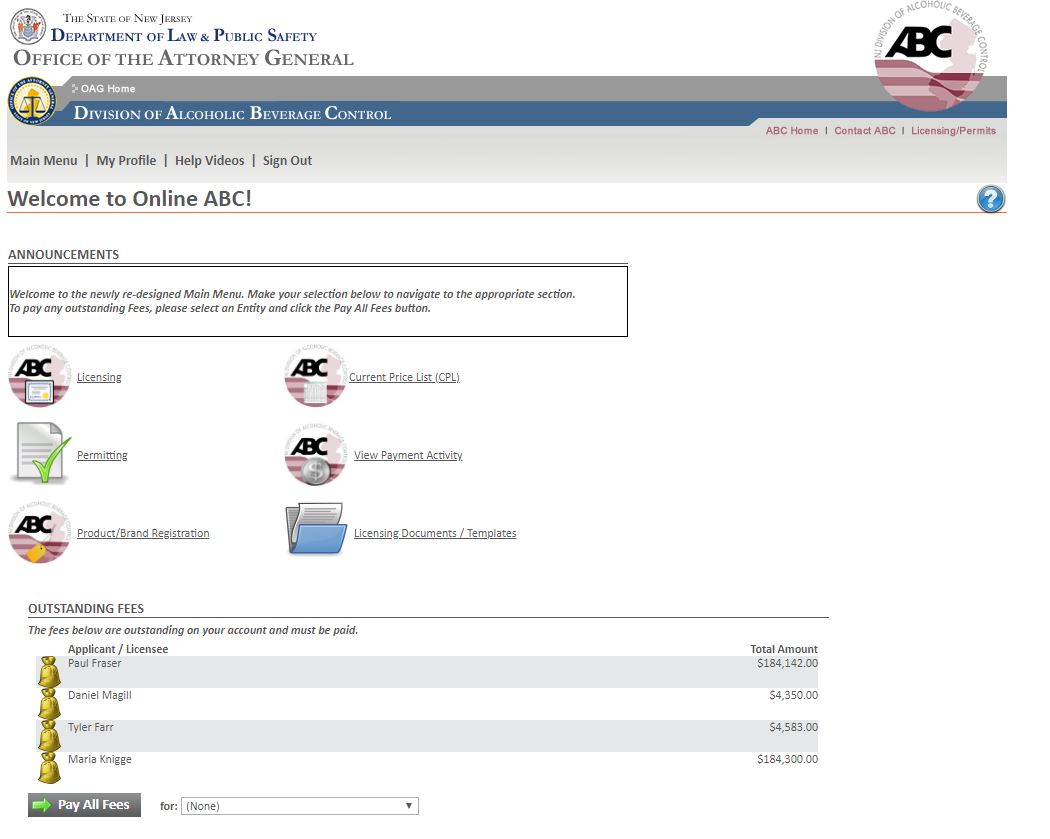
From the Main Menu, you can do the following:
•
|
Navigate to the License menu where you can see your current Licenses, and apply for new Licenses.
|
•
|
Navigate to the Permit menu where you can see your current Permits, and apply for new Permits.
|
•
|
Navigate to the Products/Brands where you can apply for, Renew, or add Distributors to Products.
|
•
|
Navigate to the Current Price List menu, where you can search for and submit Current Price Lists.
|
•
|
Navigate to the Payment Activity Search, where you can view past payments.
|
•
|
Navigate to the Licensing Documents / Templates menu, where you can download Documents you may need for a License/Permit/Product application.
|
•
|
OUTSTANDING FEES - Any Outstanding fees (assessed against jobs) that need to be paid. Select a Legal Entity, then click the Pay All Fees button. You will be taken to the Payment page where payment can be made.
|
•
|
Update your Profile.
|
•
|
Watch Help Videos.
|
|
 Main Menu